
Recently I have been designing a website for a client and needed to create a a favicon image. A favicon is the graphic you see in the address bar before the URL or in the browser tab before the name of the page. The size of favicons are 16x16 or 32x32. The most supported file format for this image is ico which is not something you can just Save As in Photoshop. In the past, I have used a separate application that I had to install on my computer. I have a new computer now, so this would mean I would have to spend time to research what application would work best for my machine and this just seemed like a pain plus I was in a hurry since there was lots of testing to do for the said website.
Luckily, the good people at Punk Labs created a web application that will take many existing graphics and convert them to ico format. This is a very useful tool for web designers to have in their arsenal.
Check it out: http://converticon.com/
More about favion: http://en.wikipedia.org/wiki/Favicon
Monday, November 22, 2010


Friday, September 17, 2010
Inspirational: Painting with Light from an iPad
Dentsu London, a creative communications agency has crossed new media with old media and created something new. First the start by creating 3D animations, converting them into a virtual CAT scan view and then playing them on an iPad. Next they have a person move the iPad playing the animation (which looks just like a series of squares) through physical space in front of a camera which is set to a long exposure. They repeat this process many times to create a stop-frame animation that extrudes the light from the iPad to spell words out and create light objects that seem to dance and sway to the ambient electronic music they put the artwork to.
Have a look at this creative ground breaking work: HERE.
For a more comprehensive overview of the project, visit their collaborator's blog: BERG.

Have a look at this creative ground breaking work: HERE.
For a more comprehensive overview of the project, visit their collaborator's blog: BERG.
Tuesday, August 24, 2010
Inspirational: Koralie
I just love the style of Koralie. Her artwork is a combination of Japanese manga style with the elegance of old Japanese prints and a side of modern street-art flair. Her art medium ranges from galley installations, graphic design, photography and graffiti. Her website has an appropriate use of Flash animation as an introduction to the page too and even has four different animations to look at in the lower left corner of the website (titled moods). Check them all out! Her style reminds me a lot of Italian artist Tokidoki, so check out his website if you like Koralie's art.

Friday, August 13, 2010
Inspirational: Infographics

Infographics or information graphics are a great tool to express complex ideas into easily understood units using graphics and text. Since most people just scan websites and magazines, being able to condense information into infographics is a real advantage. The website graphicdesignblog.org has posted 15 modern examples of good inforgraphics. Have a look at the examples HERE.
Friday, July 30, 2010
History of Public Relations

It is important to examine the founder of modern public relations and know his techniques. Apple recently came out with a commercial for their new phone that plays heavily to your emotions by showing a man experiencing the birth of his child over the phone's camera feature. The would be a classic Bernays technique. I recommend you watch the series at the great website freedocumentaries.org.
Friday, July 9, 2010
Inspirational: Illustrated RSA Speech About Motivation

Friday, June 25, 2010
Tutorial: Seemless Patterns
If you ever find yourself needing to make a seemless pattern, Veerle's Blog has a great Photoshop tutorial for you to read. Check out her post HERE.
Monday, June 21, 2010
Tutorial: How to Draw a Manga Face

Friday, June 11, 2010
Inspirational: The Unexpected Creates Big Impact

One of the biggest thrills I get is seeing art and animation used in unexpected ways. MUSE Amsterdam and Starcom did just that for client Samsung in a cutting edge marketing campaign last month. The ad campaign has two elements to it, a live event and recorded but interactive replay of the event.
First, they created a live event in front of an eager crowded street watching an overlaid projection of 3D artwork onto a historic building. The animation shows the building cracking and bursting open with butterflies, water and vines. It's a beautiful example of their client's new 3D-Outdoor projection system. Also at the live event, representatives showcase the new 3D LED TV for visitors and they have a drawing for visitors to win one of their own.
Second, for the vast audience unable to attend the live event in Amsterdam, they posted the video on YouTube. The video looks just like what you would expect from a normal YouTube page but then as the video shows the animation of the building cracking, the page suddenly cracks open with it revealing vines and water. The top YouTube banner falls to the bottom on the page and butterflies are flying out on the comments sections and thumbnail previews. A pop up informs the user to click on as many butterflies as possible for a chance to win their own Samsung 3D LED TV and the game begins! The final reveal has the building completely destroyed and showing the client's product.
It is a great balance of beautiful artwork, unexpected elements and interactivity. Have a look at the live event HERE and the interactive ad HERE.
Friday, June 4, 2010
Inspiration: Art Nouveau
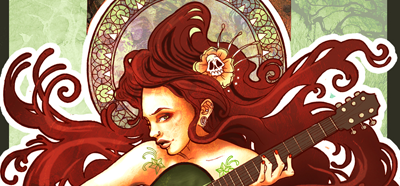
I love the style of art called Art Nouveau ever since my eyes first saw it. One of the most important artists to popularize this style was the great illustrator, Alphonse Mucha, who designed many Paris posters in the late 1800s. The style spread quickly and into other fields of art like furniture, decor, architecture, jewelry and even can be seen in the stained glass style of Louis Comfort Tiffany. Common traits of Art Nouveau is symmetry, ornate organic elements, mythology content, elaborate framing of the main subject, and a muted color palate. While browsing though the internet for inspiration, I found a collection of new artists with a new take on this classic style. Have a look HERE. I really like the Iron Man Art Nouveau piece HERE as well.
Tuesday, May 11, 2010
Software Review: Google Sketchup
Google has come out with a pretty impressive free 3D CAD program called Sketchup. I gave it a try and really like what I see. Most of the tools are intuitive and with a little practice, this could be a very useful tool for 3D models and animation in presentations, digital art and more. It is able to import existing CAD designs as well as having an extensive model library, called 3D Warehouse, to place objects and buildings into to your design.The Layers feature does work differently than most programs. Be sure to watch the useful tutorial on that HERE. Most of the other tools have modifier keys like CONTROL and SHIFT so play around to get the feel for it or watch other useful tutorial videos HERE.There is also a growing community for Google Sketchup with an online forum, contests and a gallery. Check it out!
Wednesday, May 5, 2010

Friday, April 23, 2010
Software Review: Kdenlive

The open source community has released a free video editing program called Kdenlive. This great program can do all the basic multi-track video editing you would expect plus comes with some preset effects and title animations. It is available for download on the Mac, a wide variety of open source operating systems (i.e. Ubuntu) and can be run on a live DVD or live USB stick for Windows users (boots into Linux). I recommend taking a look at NixelPixie's tutorial which gives a great walk through of the software and can be seen HERE.
Friday, April 9, 2010
Tutorial: UsabilityPrinciples

Friday, April 2, 2010
Free Fonts

Wednesday, March 24, 2010
Free Textures from BittBox

Wednesday, March 17, 2010
Inspirational: Font Fun
 The graphic design blog, YouTheDesigner has posted a great collection of text-art. Text-art is the manipulation of text shape, size and color to create an image. Check out the collection HERE.
Monday, March 8, 2010
Tutorial: Depth of Field Shift
In last week's post, I gave a quick tutorial on how to give a tilt-shift effect on photographs that have been shot from above. This same technique can be applied to photographs shot from eye level which can alter their depth of field.
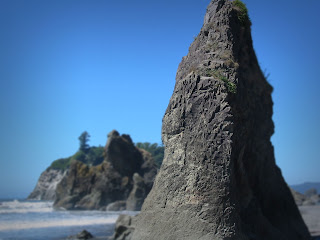
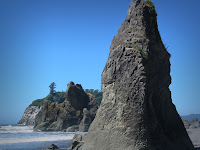 In this example, I have used a photograph I took on the Olympic Peninsula, WA. The photo to the right is the unaltered version. Make the duplication layer just like in the previous tutorial and add a layer mask to it.
However, since this effect will be seen from eye level, a simple reflected gradient mask will not necessarily work to give the desired effect. Other objects in the foreground might be on the same plane as objects in the middle or background that we wish to give focus to, therefore a more precise layer mask is needed.
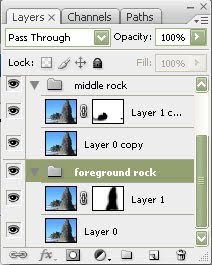 On this example I created two different groups to demonstrate the effect. The first group, named "foreground rock", shows the masked rock in the foreground created using the either the quick mask mode or using a black brush on the blurred layer mask. The second group, named "middle rock" shows the masked out rock in the middle ground. Remember we are manipulating the layer that has been blurred and masking out the area that we want to be sharp, which is the layer underneath it.
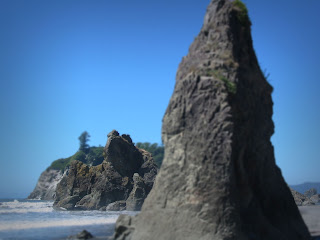
Here are the final results for the two different depth of field alterations to the photograph:
A great way to give an interesting effect to a Flash animation is to use images that you can alter the depth of field to. Just open up the Flash file, import the two images onto separate layers, make them into movie clips and then tween the alpha (opacity) between the two which will give the effect of a lens depth of field shift from foreground to middle ground or background.
 In this example, I have used a photograph I took on the Olympic Peninsula, WA. The photo to the right is the unaltered version. Make the duplication layer just like in the previous tutorial and add a layer mask to it.
However, since this effect will be seen from eye level, a simple reflected gradient mask will not necessarily work to give the desired effect. Other objects in the foreground might be on the same plane as objects in the middle or background that we wish to give focus to, therefore a more precise layer mask is needed.
 On this example I created two different groups to demonstrate the effect. The first group, named "foreground rock", shows the masked rock in the foreground created using the either the quick mask mode or using a black brush on the blurred layer mask. The second group, named "middle rock" shows the masked out rock in the middle ground. Remember we are manipulating the layer that has been blurred and masking out the area that we want to be sharp, which is the layer underneath it.
Here are the final results for the two different depth of field alterations to the photograph:


A great way to give an interesting effect to a Flash animation is to use images that you can alter the depth of field to. Just open up the Flash file, import the two images onto separate layers, make them into movie clips and then tween the alpha (opacity) between the two which will give the effect of a lens depth of field shift from foreground to middle ground or background.
Friday, March 5, 2010
Tutorial: False Tilt-Shift Photo Effect
 I was very inspired by THIS amazing video which uses a post-production false tilt-shift camera effect to make city scenes seem miniaturized. I went through some of my old photographs to see how they would look with the effect. It is best to use a photograph that has been shot from above the subject or location. The photo to the right is my starter image, shot on a bridge in Seattle.
Open the image in Photoshop and create a duplicate layer of the image (Control + J). Use a Lens Blur Filter on this duplicate layer.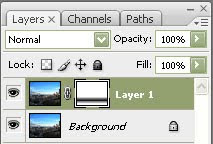

Now create a Layer Mask on the blurry layer. On the Layer Mask, use a Reflected Gradient on the area you wish to be the main subject of the image.
Normally, it is best to exaggerate the saturation levels to give it that "not real" feel but this photo was already brightly colored. I did, however, adjust the curves.
For the final touch, I created a low opacity layer with a black fade around the corners to give it that extra focus in the center. Done! Here is the final image. Click to enlarge it.

UPDATE:
Here are a few more examples of this effect on some of my other photographs. Click to enlarge.


Thursday, March 4, 2010
Portfolio Spotlight: Exopolis, Inc.

It is always inspirational to check out some of the top design studios. One company that I have been following for years is Exopolis, Inc. Their markets range from web, broadcast, print, film/animation and even mobile. Have a look at their diverse portfolio and demo reels HERE.
Subscribe to:
Posts (Atom)